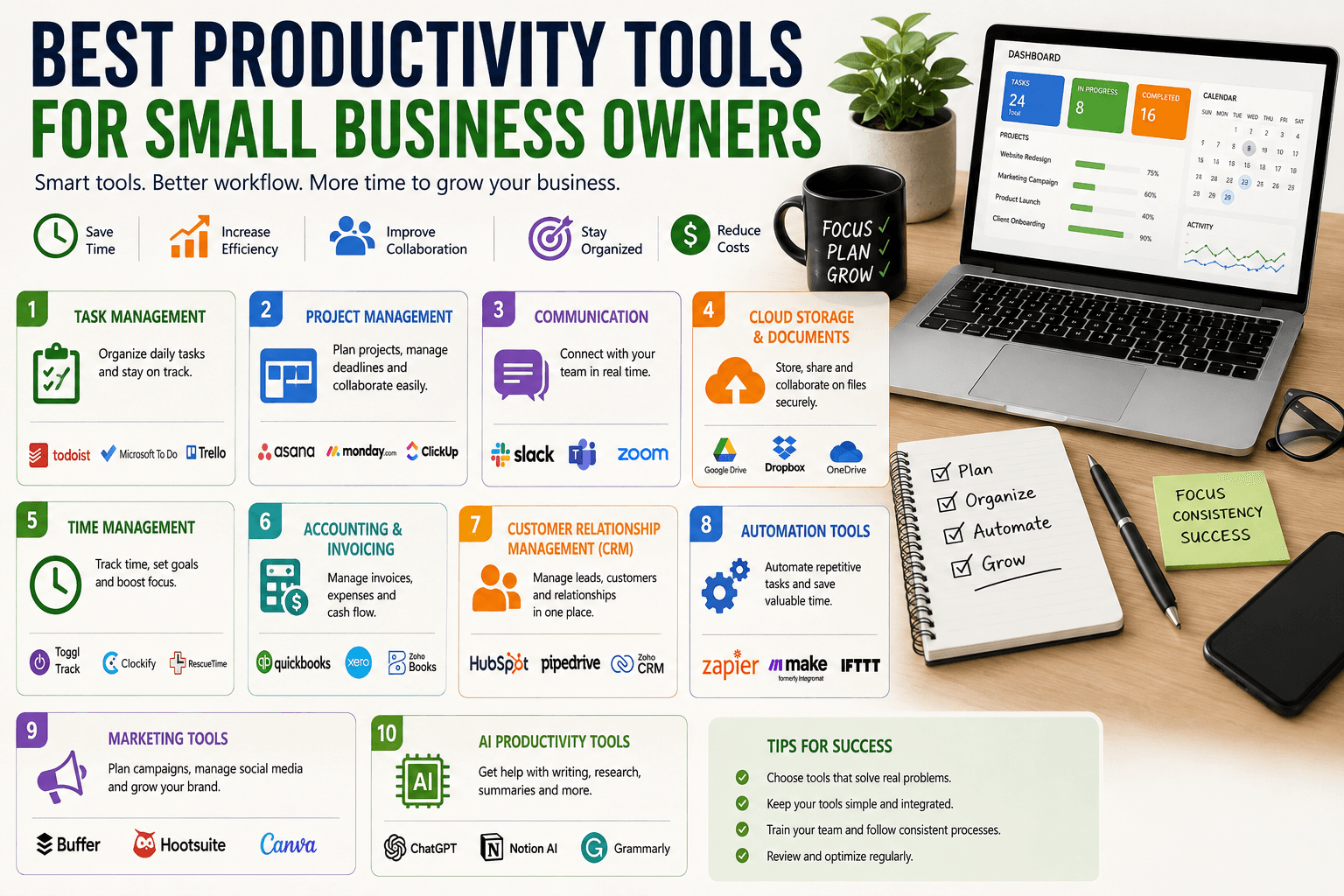

Running a small business often means managing many responsibilities at the same time. Business owners may need to communicate with customers, manage projects, organize finances, create marketing content, schedule meetings, and keep track of daily tasks—all while trying to grow the business.
Productivity tools can make these responsibilities easier to manage. The right software can reduce repetitive work, improve organization, simplify communication, and help small teams accomplish more without significantly increasing costs.
The goal is not to use dozens of applications. Instead, small business owners should choose tools that solve specific problems and fit naturally into their existing workflows.
What Are Productivity Tools?
Productivity tools are software applications that help individuals and businesses organize work, manage information, communicate, automate tasks, and complete projects more efficiently.
Common categories include:
Task management
Project management
Communication
Time management
Document management
Accounting
Customer relationship management
Marketing
Automation
Team collaboration
Different businesses need different combinations of tools. A freelance designer may need a task manager and invoicing system, while a growing company may require project management, CRM, accounting, and collaboration software.
Why Productivity Tools Matter for Small Businesses
Small businesses usually operate with limited employees and resources. Every hour matters.
The right productivity tools can help businesses:
Save time
Reduce manual work
Organize projects
Improve communication
Track deadlines
Reduce errors
Manage customer information
Automate repetitive processes
Improve teamwork
Make better use of resources
Technology cannot solve every business problem, but it can remove many unnecessary administrative tasks.
1. Task Management Tools
Task management software helps business owners organize what needs to be done and when it needs to be completed.
Instead of keeping tasks scattered across notebooks, emails, and messages, businesses can create a centralized task list.
Useful features may include:
To-do lists
Due dates
Priority levels
Recurring tasks
Reminders
Assignments
Progress tracking
For example, a marketing team can create tasks for writing an article, designing an image, publishing social media posts, and reviewing campaign results.
A simple task management system can prevent important responsibilities from being forgotten.
2. Project Management Software
As a business grows, simple to-do lists may no longer be enough.
Project management tools help teams organize larger projects into stages and assign responsibilities.
A project might include:
Planning → Research → Production → Review → Launch
Team members can see what has been completed, what is currently being worked on, and what still needs attention.
Project management software is especially useful for agencies, software companies, marketing teams, construction businesses, and organizations handling multiple client projects.
3. Communication Tools
Fast and organized communication is essential for modern businesses.
Communication platforms can reduce the need for long email chains and make it easier for teams to discuss specific projects.
Useful features can include:
Direct messaging
Group conversations
File sharing
Voice calls
Video meetings
Searchable message history
Topic-based channels
However, businesses should avoid creating unnecessary communication channels. Too many notifications can actually reduce productivity.
Establish simple communication rules so employees know where different types of information should be shared.
4. Cloud Storage and Document Management
Cloud storage allows businesses to store documents online and access them from different devices.
This can be useful for:
Contracts
Presentations
Spreadsheets
Marketing materials
Customer documents
Business reports
Internal files
Cloud collaboration also allows multiple people to work on documents without constantly emailing different versions.
Businesses should use appropriate access controls and security measures when storing sensitive information.
5. Time Management Tools
Time management tools help business owners understand how they spend their working hours.
These tools can be useful for:
Tracking projects
Monitoring billable hours
Identifying time-consuming activities
Improving scheduling
Creating work routines
For service businesses that charge clients based on time, accurate time tracking can also simplify invoicing.
Time tracking can reveal that certain administrative tasks consume more time than expected, providing an opportunity for automation or process improvement.
6. Accounting and Invoicing Software
Financial administration can consume significant amounts of time for small businesses.
Accounting software can help manage:
Invoices
Expenses
Payments
Financial records
Reports
Tax-related information
Automated invoice reminders can also reduce the need to manually follow up with customers.
Business owners should choose accounting software that fits their local financial and tax requirements and maintain proper records.
7. Customer Relationship Management Tools
Customer relationship management (CRM) software helps businesses organize customer and prospect information.
A CRM can store:
Contact details
Customer history
Sales opportunities
Follow-up tasks
Communication records
Purchase information
Instead of relying on individual spreadsheets or personal notes, teams can maintain a centralized view of customer relationships.
This can be particularly valuable as the number of customers increases.
8. Scheduling Tools
Scheduling meetings through long email exchanges can waste time.
Scheduling software allows customers or colleagues to select available time slots based on predefined availability.
Businesses can use scheduling tools for:
Sales calls
Consultations
Interviews
Customer support
Team meetings
Appointments
Automated reminders can also reduce missed meetings.
9. Note-Taking and Knowledge Management Tools
Important information is often scattered across emails, documents, messages, and notebooks.
Note-taking and knowledge management tools provide a centralized place to store information.
Businesses can create resources for:
Meeting notes
Procedures
Ideas
Research
Training materials
FAQs
Internal documentation
A well-organized knowledge base can help new employees find information without repeatedly asking colleagues the same questions.
10. Marketing Productivity Tools
Marketing teams often manage many different tasks simultaneously.
Marketing productivity software can help with:
Content planning
Social media scheduling
Email campaigns
Keyword research
Analytics
Graphic design
Campaign management
Automation can reduce repetitive publishing and reporting tasks.
However, automation should not replace strategy. Businesses still need to create relevant content and communicate authentically with their audiences.
11. AI Productivity Tools
Artificial intelligence is becoming an increasingly useful productivity technology.
AI tools can assist with tasks such as:
Brainstorming
Writing drafts
Summarizing documents
Meeting notes
Data analysis
Research assistance
Customer support
Content repurposing
Software development
For example, a business owner could use an AI assistant to turn meeting notes into a structured task list.
AI outputs should still be reviewed by humans, particularly when dealing with sensitive information, important business decisions, or customer-facing content.
12. Automation Tools
Automation software connects different applications and allows certain tasks to happen automatically.
For example:
New customer completes a form → Customer information is added to CRM → Welcome email is sent → Sales task is created
Without automation, an employee might have to perform each of these steps manually.
Automation can be especially valuable for repetitive workflows that happen frequently.
Before automating a process, make sure the process itself is well designed. Automating a confusing workflow can simply make problems happen faster.
13. Calendar and Planning Tools
A well-managed calendar helps business owners protect time for important activities.
Use calendar tools to schedule:
Meetings
Deadlines
Deep-work sessions
Marketing activities
Financial reviews
Team check-ins
Avoid filling every available hour with meetings. Productive businesses also need uninterrupted time for strategic and creative work.
14. How to Choose the Right Productivity Tools
There are thousands of productivity applications available, but more software does not automatically mean greater productivity.
Before purchasing a tool, ask:
What problem does it solve?
If you cannot identify a clear problem, you may not need the software.
Will employees actually use it?
A powerful tool is useless if employees find it confusing or inconvenient.
Does it integrate with existing systems?
Integrations can prevent employees from repeatedly copying information between applications.
Is it affordable?
Consider both the subscription price and the time required to implement and maintain the tool.
Is the data secure?
Review security features, permissions, backups, and data-handling practices before storing sensitive information.
Common Productivity Mistakes
Using Too Many Tools
A business can become less productive when employees have to switch between too many platforms.
Ignoring Training
Employees need to understand how and when to use each tool.
Creating Duplicate Systems
Maintaining the same information in multiple applications can create confusion and errors.
Automating Everything
Not every process should be automated. Some tasks require human judgment.
Choosing Features Over Simplicity
A tool with hundreds of features may be less useful than a simple application that employees actually use consistently.
How to Build a Simple Productivity System
Small businesses can start with a basic technology stack.
Step 1: Identify Your Biggest Time Wasters
Track repetitive activities and processes that consume significant time.
Step 2: Choose One Tool for Each Major Need
For example, use one primary system for tasks, one for communication, and one for documents.
Step 3: Create Simple Processes
Define how employees should use each tool.
Step 4: Automate Repetitive Work
Identify workflows that can safely be automated.
Step 5: Train the Team
Make sure everyone understands the system.
Step 6: Review the Setup Regularly
Remove tools that are no longer useful and improve workflows as the business changes.
The Future of Business Productivity
Productivity software is becoming increasingly intelligent. AI-powered assistants, automated workflows, integrated business platforms, and real-time analytics are changing how small businesses manage everyday work.
Instead of simply recording information, future productivity systems will increasingly help users organize information, identify priorities, summarize activities, and recommend actions.
This could allow small teams to operate more efficiently while focusing their human effort on creativity, relationships, and strategic decisions.
Final Thoughts
The best productivity tools are not necessarily the most advanced or expensive. They are the tools that solve real problems, fit the business workflow, and help employees work more effectively.
Small business owners should start by identifying where time is being wasted and then select simple tools to address those problems. As the business grows, additional systems can be introduced when there is a clear need.
A focused productivity setup can reduce administrative work, improve organization, and give business owners more time to concentrate on what matters most: serving customers and growing the business.