TNTech News 2026: New Gadgets, Big Tech & Digital Trends
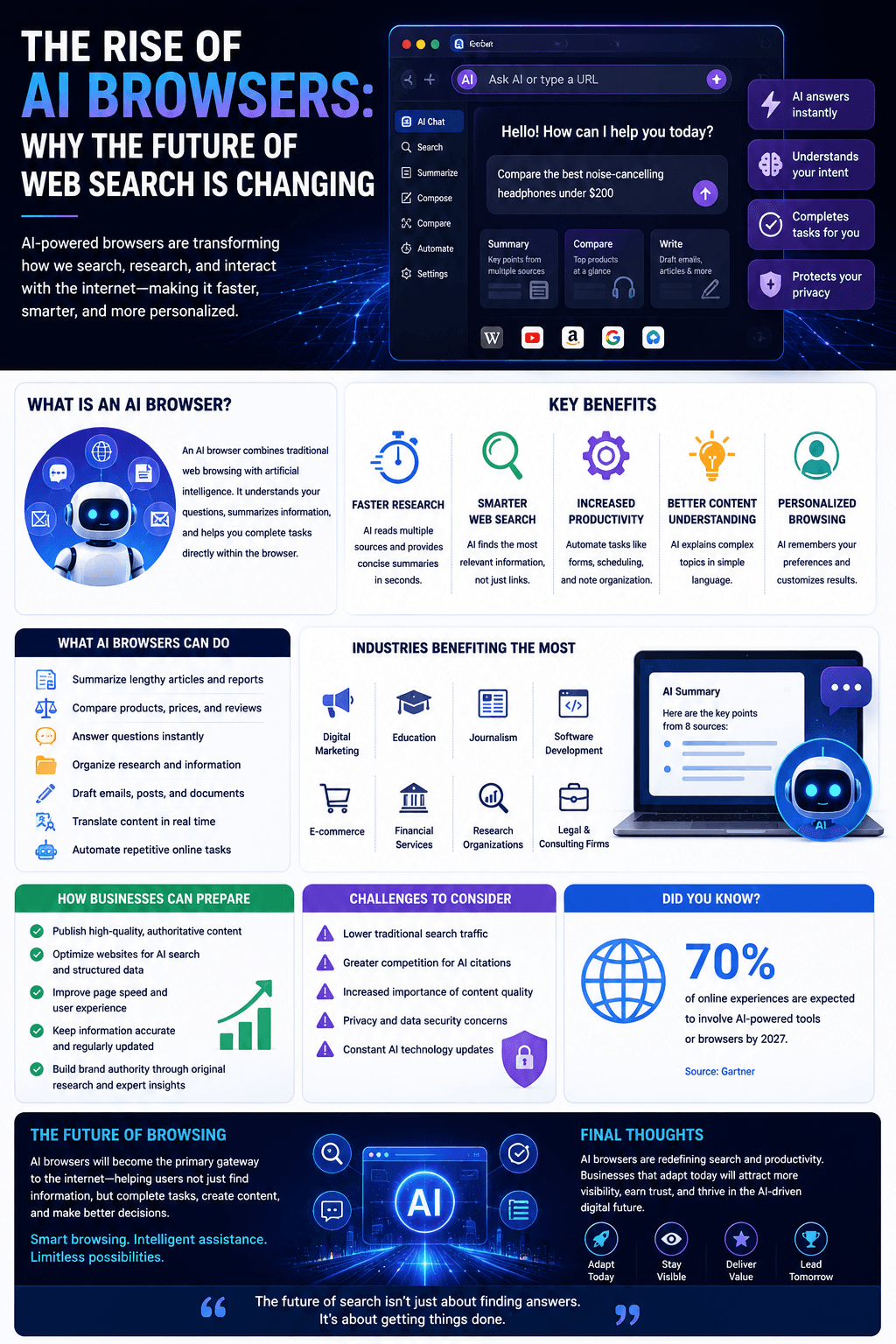
The internet is entering a new era. Instead of relying on traditional web browsers that require users to search, compare, and navigate multiple websites, a new generation of AI browsers is transforming how people interact with online information.
In 2026, AI-powered browsers are becoming intelligent digital assistants capable of answering questions, summarizing web pages, comparing products, drafting emails, conducting research, and even completing online tasks. This shift is changing the future of web search for both users and businesses.
What Is an AI Browser?
An AI browser combines traditional web browsing with advanced artificial intelligence. Instead of simply displaying web pages, it understands user intent and helps complete tasks directly within the browser.
An AI browser can:
Summarize lengthy articles
Compare products across websites
Answer questions instantly
Organize research
Draft emails and documents
Translate content in real time
Automate repetitive online tasks
It acts more like a personal digital assistant than a standard browser.
Why AI Browsers Are Growing
People want faster, more efficient ways to find information. Instead of opening dozens of tabs, AI browsers provide direct answers and actionable insights in one place.
Businesses are also embracing AI browsers because they improve productivity and reduce time spent on routine online tasks.
Key Benefits
1. Faster Research
AI reads multiple sources and provides concise summaries within seconds.
2. Smarter Web Search
Instead of showing hundreds of links, AI browsers identify the most relevant information.
3. Increased Productivity
Users can automate repetitive tasks such as filling forms, scheduling meetings, and organizing notes.
4. Better Content Understanding
AI explains complex topics in simple language and highlights the most important points.
5. Personalized Browsing
AI remembers user preferences and delivers customized recommendations based on previous activity.
Industries Benefiting the Most
AI browsers are improving efficiency across:
Digital Marketing
Education
Journalism
Software Development
E-commerce
Financial Services
Research Organizations
Legal and Consulting Firms
Professionals who spend hours online researching and creating content will benefit the most.
How Businesses Can Prepare
To stay competitive in the AI browser era, businesses should:
Publish high-quality, authoritative content.
Optimize websites for AI search and structured data.
Improve page speed and user experience.
Keep information accurate and regularly updated.
Build brand authority through original research and expert insights.
Challenges to Consider
Businesses should also prepare for:
Lower traditional search traffic
Greater competition for AI citations
Increased importance of content quality
Privacy concerns
Constant AI technology updates
Success will depend on becoming a trusted source that AI browsers choose to recommend.
The Future of Browsing
Experts predict AI browsers will become the primary gateway to the internet. Rather than searching manually, users will increasingly ask AI assistants to perform tasks, compare information, and deliver personalized recommendations.
Businesses that optimize for AI-driven browsing today will be better positioned to attract customers in the future.
Final Thoughts
AI browsers are redefining the online experience by making web search faster, smarter, and more interactive. As artificial intelligence continues to evolve, browsing will shift from simply finding information to completing meaningful tasks with AI assistance.
The future of the internet belongs to businesses that create trustworthy content and adapt to the growing influence of AI-powered browsing.
FAQs:
1. What is an AI browser, and how is it different from a traditional web browser?
An AI browser is a next-generation web browser that integrates artificial intelligence directly into the browsing experience. Unlike traditional browsers that simply display websites after a user performs a search, AI browsers can answer questions, summarize web pages, compare products, generate content, automate repetitive tasks, and even complete complex workflows. Instead of opening multiple tabs to find information, users can interact with an AI assistant that understands context and delivers personalized responses in real time.
2. Why are AI browsers becoming so popular in 2026?
AI browsers are gaining popularity because they significantly reduce the time users spend searching for information. Businesses, students, researchers, marketers, and developers can accomplish tasks faster through conversational interfaces, intelligent automation, and instant summaries. As generative AI continues to improve, users increasingly prefer asking natural-language questions instead of manually filtering through dozens of search results.
3. How are AI browsers changing the future of web search?
AI browsers are transforming web search from a keyword-based process into a conversation-driven experience. Rather than displaying a list of links, AI browsers analyze multiple sources, understand user intent, and provide direct answers. This shift allows users to complete research, shopping, planning, coding, and content creation with fewer clicks while improving productivity.
4. Which industries will benefit the most from AI browsers?
Many industries are expected to benefit, including healthcare, finance, education, legal services, software development, e-commerce, marketing, journalism, and customer support. Professionals in these sectors can use AI browsers for faster research, document analysis, data comparison, workflow automation, and intelligent decision-making, helping organizations save time and improve efficiency.
5. Can AI browsers replace traditional search engines like Google?
AI browsers are unlikely to eliminate search engines entirely, but they are changing how people interact with them. Many AI browsers still rely on search engine indexes for information while presenting results in a conversational format. Instead of replacing search engines, they are redefining the user experience by reducing the need to manually visit multiple websites.
6. How do AI browsers improve online productivity?
AI browsers increase productivity by summarizing lengthy articles, writing emails, translating languages, organizing research, generating reports, answering complex questions, and automating repetitive tasks. Users no longer need to switch between multiple tools because many AI-powered features are integrated into a single browsing environment.
7. What role does generative AI play in modern web browsers?
Generative AI serves as the intelligence layer inside AI browsers. It understands user intent, generates human-like responses, creates written content, explains technical concepts, writes code, summarizes documents, and assists with creative tasks. This capability transforms browsers from passive viewing tools into active digital assistants.
8. Are AI browsers more secure than traditional browsers?
Many AI browsers include advanced security features such as phishing detection, malicious website warnings, privacy controls, and AI-powered threat analysis. However, security depends on the browser developer, user settings, and regular updates. Users should still follow cybersecurity best practices, including using strong passwords and enabling multi-factor authentication.
9. How will AI browsers impact SEO and digital marketing?
AI browsers are expected to reshape SEO by prioritizing authoritative, well-structured, and trustworthy content. Businesses may receive traffic through AI-generated answers instead of traditional search rankings alone. Marketers will need to focus on expertise, original content, structured data, topical authority, and user intent rather than relying solely on keyword optimization.
10. Will AI browsers reduce website traffic?
Some websites may experience fewer direct visits because AI browsers often summarize information without requiring users to open every page. However, high-quality websites that publish original research, expert insights, and valuable resources are likely to remain important information sources and continue attracting qualified visitors.
11. How are AI browsers changing online shopping?
AI browsers simplify shopping by comparing products, analyzing customer reviews, tracking prices, recommending alternatives, summarizing specifications, and helping users make informed purchasing decisions. Instead of manually comparing dozens of websites, shoppers receive personalized recommendations within seconds.
12. Can businesses integrate AI browsers into their daily workflows?
Yes. Businesses can use AI browsers for market research, competitor analysis, customer support, document summarization, content creation, project management, meeting preparation, and workflow automation. These capabilities help teams improve efficiency while reducing manual work across departments.
13. What privacy concerns are associated with AI browsers?
Since AI browsers process user queries, browsing activity, and contextual information, privacy remains an important concern. Users should review privacy policies, manage permission settings, avoid sharing sensitive information unnecessarily, and choose browsers with transparent data protection practices and strong encryption standards.
14. How do AI browsers help developers and programmers?
Developers benefit from AI browsers through instant code generation, debugging assistance, API documentation summaries, code explanations, syntax correction, and automated testing suggestions. These features reduce development time while improving coding accuracy and productivity.
15. Will AI browsers influence online education?
Absolutely. Students and educators can use AI browsers to summarize textbooks, explain difficult concepts, generate study notes, create quizzes, translate educational material, and organize research more efficiently. Personalized AI assistance makes learning faster and more accessible across various subjects.
16. Are AI browsers suitable for businesses of all sizes?
Yes. Startups, small businesses, and large enterprises can all benefit from AI browsers. Small businesses can automate routine tasks with limited resources, while larger organizations can improve collaboration, research, customer service, and enterprise productivity using AI-assisted browsing experiences.
17. How do AI browsers support content creators?
Content creators can brainstorm ideas, write articles, optimize SEO, generate social media captions, summarize research, edit grammar, create outlines, and discover trending topics directly within AI browsers. This reduces content production time while maintaining quality and consistency.
18. What technologies power AI browsers?
AI browsers rely on large language models (LLMs), natural language processing (NLP), machine learning, cloud computing, semantic search, retrieval-augmented generation (RAG), and intelligent automation systems. Together, these technologies enable browsers to understand context, generate accurate responses, and perform complex tasks efficiently.
19. What challenges do AI browsers still face?
Despite rapid advancements, AI browsers still face challenges such as occasional inaccuracies, AI hallucinations, privacy concerns, computational costs, copyright considerations, misinformation risks, and the need for reliable source attribution. Continuous improvements in AI models and governance are helping address these issues.
20. What does the future hold for AI browsers and web search?
The future of AI browsers points toward highly personalized, conversational, and autonomous web experiences. Future browsers are expected to complete tasks independently, interact with multiple applications, understand user preferences, provide multimodal assistance, and become central productivity platforms. As AI technology continues evolving, web search will shift from simply finding information to intelligently completing tasks and delivering actionable insights.