The internet has undergone countless transformations over the past three decades. From static web pages to interactive applications, and from desktop computers to mobile-first experiences, browsing technology has continuously evolved to meet user demands. In 2026, another major shift is taking place—AI browsers are redefining how people search, work, and interact with online content.
Traditional browsers such as Chrome, Firefox, Safari, and Edge were designed primarily to display websites quickly and securely. While they have introduced useful features over the years, they still depend heavily on users manually searching, clicking links, comparing information, and completing repetitive tasks.
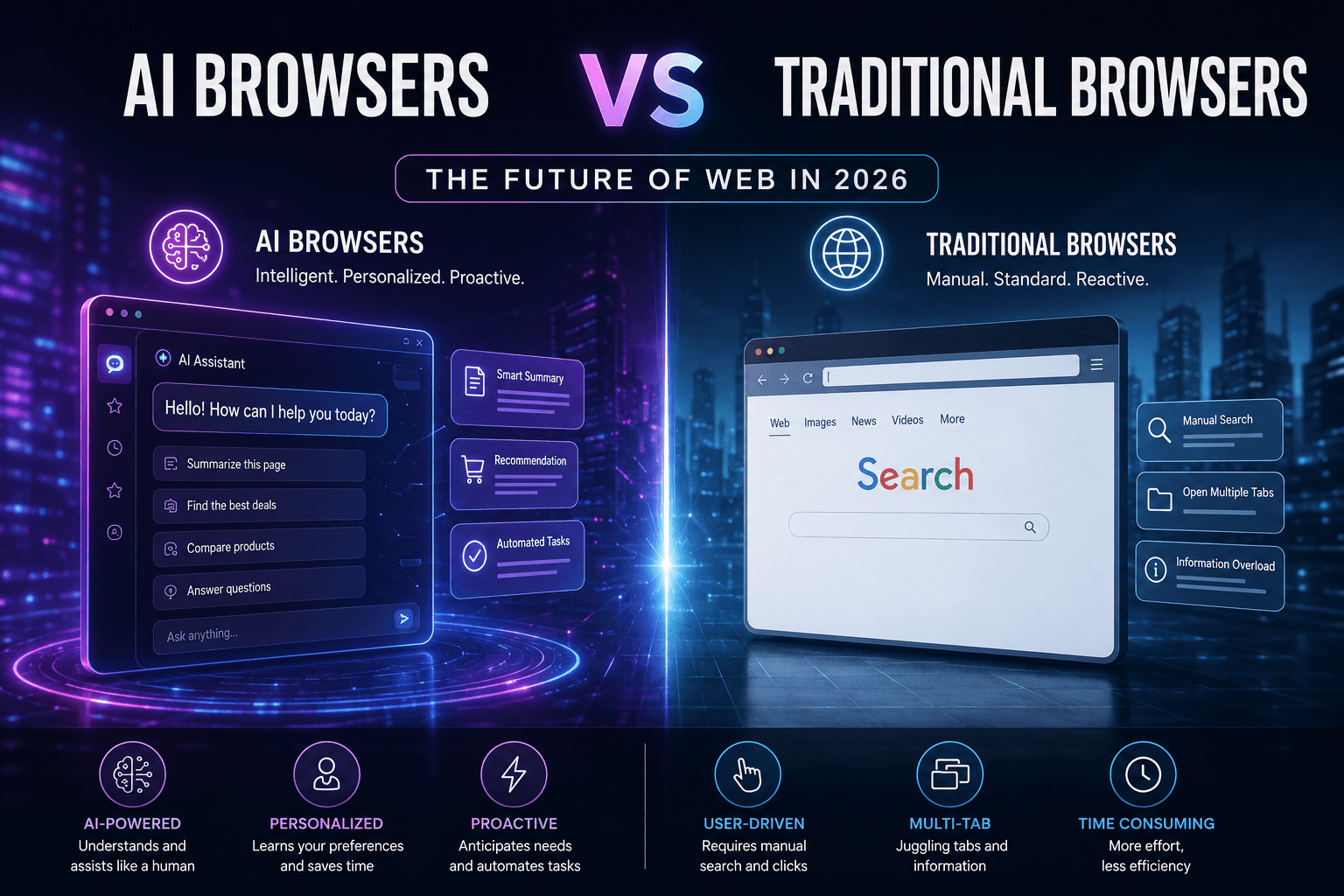
AI browsers represent an entirely different approach. Instead of acting as passive windows to the internet, they function as intelligent digital assistants capable of understanding context, summarizing information, automating workflows, and even completing tasks on behalf of users.
This evolution is changing not only personal browsing habits but also how businesses operate, conduct research, engage customers, and improve employee productivity. As organizations increasingly adopt artificial intelligence across departments, AI-powered browsing is becoming an essential component of digital transformation.
What Is an AI Browser?
An AI browser is a web browser enhanced with artificial intelligence technologies that help users perform tasks more efficiently. Rather than simply loading webpages, AI browsers can understand user intent, interpret natural language, summarize lengthy articles, compare products, answer questions, generate content, and automate repetitive online actions.
Unlike conventional browsers, AI browsers reduce the need for users to switch between multiple tabs or manually collect information from different sources. They analyze large amounts of online content, present concise insights, and help users make informed decisions faster.
Many AI browsers also integrate directly with productivity tools, customer relationship management systems, cloud storage platforms, and enterprise software, creating a seamless digital workspace.
How Traditional Browsers Work
Traditional browsers are primarily designed to retrieve and display web pages. Users enter a URL or search query, browse search results, open multiple pages, and manually process information.
Although modern browsers offer features like password management, synchronization across devices, security protections, and extensions, they still rely on users to perform most actions themselves.
For example, if someone wants to compare several software products, they typically need to:
Open multiple websites
Read each article individually
Compare pricing
Analyze reviews
Take notes
Make a decision manually
This workflow consumes valuable time and often results in information overload.
How AI Browsers Are Different
AI browsers dramatically simplify these processes by introducing intelligent automation.
Instead of requiring dozens of tabs, users can simply ask:
"Compare the top CRM software for small businesses under $100 per month."
The AI browser gathers information from trusted sources, summarizes key differences, highlights advantages and disadvantages, and presents actionable recommendations within seconds.
This conversational approach makes browsing significantly faster and more efficient.
Key Features of AI Browsers
Intelligent Search
AI browsers understand context instead of relying only on keywords. Users can ask complex questions using natural language and receive comprehensive answers rather than just a list of links.
Automatic Content Summarization
Reading lengthy reports, research papers, and articles can consume hours.
AI browsers automatically generate concise summaries, allowing professionals to understand essential information within minutes.
This feature is especially valuable for executives, marketers, students, journalists, and researchers.
Workflow Automation
AI browsers can automate repetitive online tasks including:
Completing forms
Booking appointments
Scheduling meetings
Collecting research
Organizing documents
Drafting emails
Managing browser tabs
Automation improves efficiency while reducing manual effort.
Personalized Assistance
Unlike traditional browsers, AI browsers learn user preferences over time.
They can recommend relevant articles, organize bookmarks intelligently, remember previous conversations, and provide proactive suggestions based on browsing history and work habits.
Built-In Writing Support
Modern AI browsers include writing assistants capable of:
Drafting emails
Creating reports
Rewriting content
Improving grammar
Translating languages
Generating marketing copy
This eliminates the need to switch between multiple AI tools.
Business Benefits of AI Browsers
Businesses are among the biggest beneficiaries of AI-powered browsing.
Increased Productivity
Employees spend less time searching for information and more time making strategic decisions.
Routine research that previously required hours can often be completed within minutes.
Faster Decision-Making
Executives can instantly receive summarized reports from multiple trusted sources without manually reviewing dozens of websites.
This improves decision speed while maintaining accuracy.
Better Customer Support
Support teams can quickly access documentation, summarize customer history, and generate personalized responses.
This leads to faster resolution times and improved customer satisfaction.
Improved Marketing Research
Marketing professionals can analyze competitors, identify emerging trends, monitor industry news, and generate campaign ideas much more efficiently.
AI browsers accelerate competitive intelligence while reducing research costs.
Enhanced Collaboration
Many AI browsers integrate with workplace platforms, allowing teams to share summaries, collaborate on research, and manage projects more effectively.
AI Browsers in Different Industries
Healthcare professionals use AI browsers to summarize medical research and clinical studies.
Financial analysts rely on them to compare investment reports, monitor market trends, and identify business opportunities.
Legal professionals save significant time reviewing contracts and legal documents.
Educational institutions leverage AI browsers for research assistance and personalized learning.
Software developers use them to explain code, troubleshoot issues, and generate programming suggestions.
Virtually every knowledge-intensive profession can benefit from intelligent browsing.
Privacy and Security Considerations
As AI browsers process large amounts of user data, privacy remains a major concern.
Organizations should evaluate:
Data encryption
User consent
Cloud storage policies
AI training practices
Enterprise security standards
Compliance with industry regulations
Choosing trusted AI solutions with transparent privacy policies is essential.
Challenges of AI Browsers
Despite their advantages, AI browsers still face several challenges.
AI-generated summaries may occasionally overlook important context.
Users should verify critical information before making financial, legal, or medical decisions.
Some organizations also hesitate to adopt AI browsing because of privacy concerns, compliance requirements, and employee training needs.
Additionally, internet publishers are adapting their content strategies as AI-generated answers reduce traditional website clicks.
The Future of Browsing
Industry experts believe browsing will become increasingly conversational over the next few years.
Instead of manually navigating websites, users will simply describe their goals.
AI assistants will research information, compare products, fill out forms, schedule meetings, complete online purchases, and generate reports automatically.
This represents a fundamental shift from browsing websites to collaborating with intelligent digital assistants.
Future browsers may also integrate voice interaction, augmented reality, personalized learning, predictive recommendations, and autonomous task execution.
For businesses, this means higher productivity, lower operational costs, and faster digital workflows.
How Businesses Should Prepare
Organizations looking to stay competitive should begin preparing for AI-powered browsing today.
Recommended steps include:
Train employees on AI-assisted workflows.
Optimize website content for AI search and answer engines.
Publish authoritative, well-structured content.
Use schema markup to improve machine readability.
Strengthen data privacy and governance policies.
Experiment with AI browser integrations for customer service and research.
Companies that adapt early will be better positioned as AI browsing becomes mainstream.
Conclusion
AI browsers are reshaping the future of the internet by transforming browsers from passive tools into intelligent digital assistants. Rather than simply displaying webpages, these next-generation platforms help users search smarter, summarize complex information, automate repetitive tasks, and make faster decisions. For businesses, this means improved productivity, enhanced collaboration, and more efficient research, while individual users benefit from a more intuitive and personalized online experience.
Although traditional browsers remain reliable for everyday web access, the momentum behind AI-powered browsing is undeniable. As artificial intelligence continues to evolve, browsing will become increasingly conversational, context-aware, and task-oriented. Organizations that embrace this shift by optimizing their content, training employees, and integrating AI into daily workflows will gain a competitive edge in the digital economy. The future of the web is no longer just about accessing information—it is about working alongside intelligent systems that simplify how we learn, create, and make decisions.