TNTech News 2026: New Gadgets, Big Tech & Digital Trends
Getting your website indexed by Google is essential for generating organic search traffic. However, publishing content alone does not guarantee that Google will discover, crawl, and index every page.
Technical SEO problems, poor site architecture, duplicate content, and incorrect indexing directives can prevent important pages from appearing in search results.
If your website has pages that aren't being indexed, the problem may not be your content strategy. It could be a technical issue that is preventing Google from properly accessing or understanding your website.
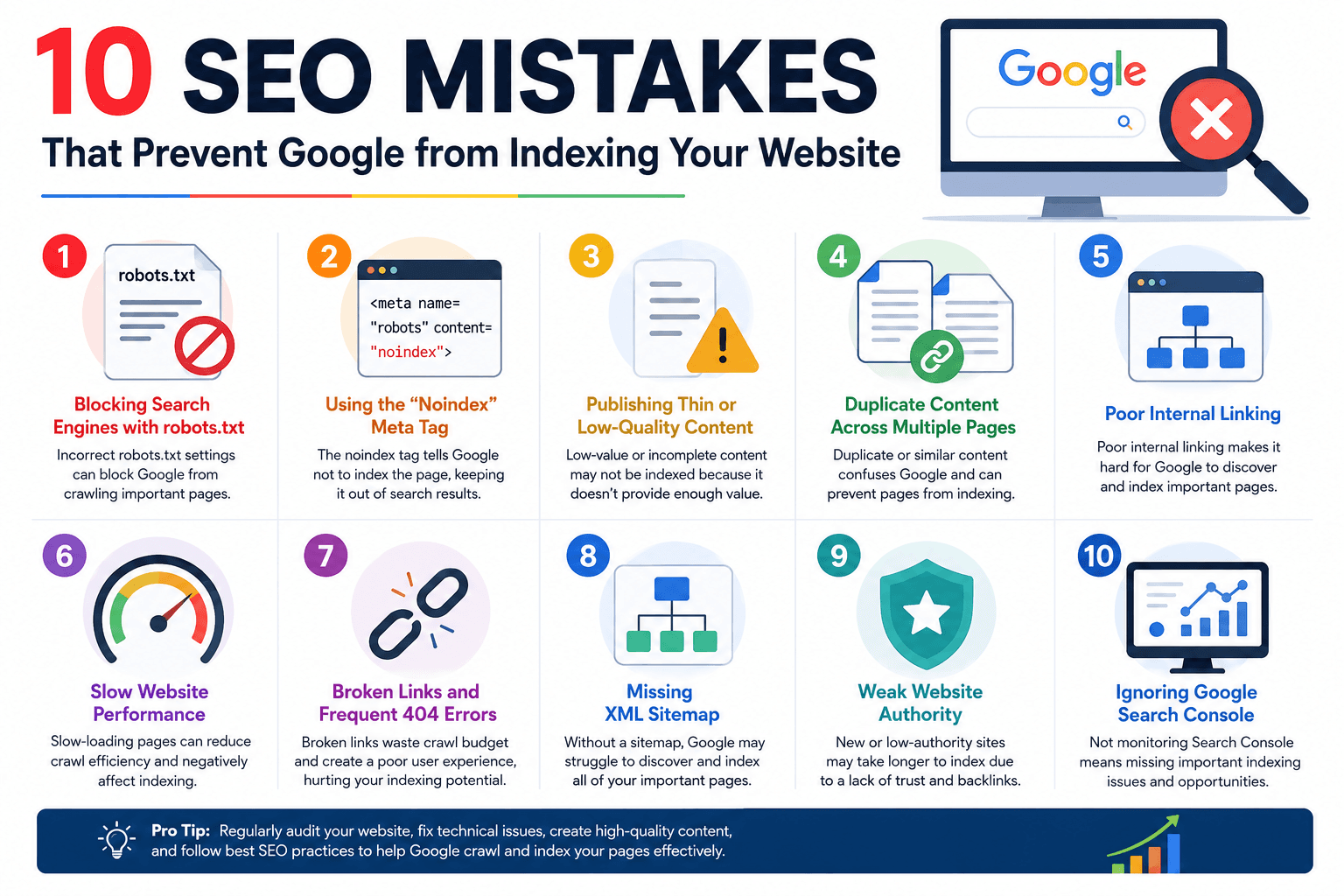
Here are 10 common SEO mistakes that can prevent Google from indexing your website—and how to fix them.
1. Accidentally Adding a Noindex Tag
One of the most direct reasons a page may not be indexed is an accidental noindex directive.
A page can contain:
<meta name="robots" content="noindex">This tells search engines that the page should not be included in their index.
A noindex directive is useful for pages such as private sections, internal search results, or certain low-value pages. However, accidentally adding it to an important article, product page, or service page can prevent that page from appearing in Google.
How to Fix It
Check the page's source code and SEO settings in your CMS.
Make sure important pages don't contain a noindex directive. Also review your website's global SEO settings because some plugins or CMS configurations can accidentally apply indexing restrictions to entire groups of pages.
2. Blocking Important Pages With Robots.txt
The robots.txt file controls which areas of a website crawlers are allowed to access.
For example:
User-agent: *
Disallow: /blog/
This tells crawlers not to crawl URLs under /blog/.
If your important content is accidentally blocked, Google may have difficulty discovering or crawling those pages.
How to Fix It
Review your robots.txt file regularly.
Make sure important sections such as:
Blog posts
Product pages
Service pages
Categories
Resources
Landing pages
are not unintentionally blocked.
Remember that robots.txt is primarily a crawling control mechanism, not a reliable way to keep URLs out of Google's index.
3. Creating Orphan Pages
An orphan page is a page that has no meaningful internal links pointing to it.
Google often discovers URLs by following links across websites. If an important article exists but isn't linked from other relevant pages, its discovery can become more difficult.
For example, imagine publishing 200 blog posts but never linking to older articles.
Those pages may become isolated from the rest of your website.
How to Fix It
Build a strong internal linking structure.
Link related content together naturally.
For example:
Blog post → Related article → Service page
You can also link important pages from:
Navigation menus
Category pages
Resource hubs
Related-post sections
Pillar content
A logical site structure makes it easier for both users and search engines to understand your content.
4. Having a Poor or Incorrect XML Sitemap
An XML sitemap provides search engines with a list of URLs that you want them to discover.
A sitemap can be especially useful for:
Large websites
New websites
Websites with many pages
Sites with complex architecture
Websites containing frequently updated content
However, an inaccurate sitemap can create unnecessary problems.
Common Sitemap Mistakes
Avoid including:
Broken URLs
Redirected URLs
Noindex pages
Duplicate URLs
Incorrect canonical versions
How to Fix It
Create a clean XML sitemap containing the canonical URLs you want Google to discover.
Then submit it through Google Search Console.
5. Publishing Thin or Low-Value Content
Not every crawlable URL is guaranteed to be indexed.
Google may choose not to index pages that provide little unique value.
Examples include:
Very short articles
Automatically generated pages
Duplicate product descriptions
Empty category pages
Pages with minimal useful information
Near-identical location pages
The solution isn't simply to make every page longer.
Instead, focus on making pages genuinely useful.
How to Improve Content Quality
Add:
Original insights
Helpful examples
Relevant statistics
Expert explanations
Clear answers
Supporting information
Useful visuals
Relevant internal links
The objective should be to satisfy the searcher's intent better than competing pages.
6. Using Incorrect Canonical Tags
Canonical tags help search engines understand which URL should be treated as the preferred version when multiple URLs contain similar content.
For example:
<link rel="canonical" href="https://example.com/seo-guide/">Problems occur when the canonical points to the wrong URL.
Imagine an article at:
example.com/ai-business-trends/
but its canonical tag incorrectly points to:
example.com/about-us/
Google may treat the second URL as the preferred version and may not index the article URL as expected.
How to Fix It
Check canonical tags on important pages.
The canonical should generally point to the preferred version of that page or substantially equivalent content.
7. Creating Duplicate Content and URL Variations
Websites can unintentionally create multiple URLs containing the same or very similar content.
Examples include:
example.com/page
example.com/page/
example.com/page?utm_source=email
example.com/page?sort=latest
Large numbers of duplicate URLs can make a website harder to manage and can dilute signals between different versions.
How to Fix It
Use appropriate:
Canonical tags
Redirects
URL parameters handling
Consistent internal linking
Make sure your preferred URL is clear and consistently used throughout the website.
8. Having Server Errors and Poor Website Reliability
Google needs to access your pages successfully to crawl them.
If your server frequently produces errors such as:
500 errors
502 errors
503 errors
Timeouts
Google may have difficulty crawling your content.
A website that frequently goes offline can also create a poor experience for visitors.
How to Fix It
Monitor your website's technical performance.
Check:
Server uptime
Hosting performance
Response times
Database performance
Redirect configuration
Broken pages
Google Search Console can also help identify crawling and server-related issues.
9. Creating Long Redirect Chains
Redirects are useful when a URL has permanently moved.
However, multiple redirects can create unnecessary complexity.
For example:
Page A → Page B → Page C → Page D
This is a redirect chain.
A cleaner structure is:
Page A → Page D
Why It Matters
Long chains can:
Slow down crawling
Create unnecessary server requests
Increase the possibility of redirect errors
Make site maintenance more difficult
How to Fix It
Whenever possible, redirect old URLs directly to the final destination.
Also check your website regularly for redirect loops and unnecessary chains.
10. Ignoring Google Search Console
Google Search Console is one of the most useful tools for diagnosing indexing problems.
It can help website owners understand:
Which pages are indexed
Which pages aren't indexed
Why URLs aren't indexed
Whether pages have crawl problems
Sitemap status
Search performance
Security issues
Manual actions
The URL Inspection tool is particularly useful for individual pages.
You can enter a URL and review Google's reported information about its indexing and crawl status.
How to Fix It
Regularly monitor the Page Indexing report.
If an important page isn't indexed, investigate the reported reason rather than simply publishing more content.
How to Check Whether Google Has Indexed Your Pages
A quick way to check is to use Google's site: search operator.
For example:
site:yourwebsite.comYou can also search for a specific URL or page title.
However, this isn't a complete indexing diagnostic.
For more reliable information, use Google Search Console's URL Inspection tool.
It can provide more detailed information about whether Google has crawled and indexed a specific URL.
Why New Websites May Take Time to Be Indexed
If your website is new, indexing may take time.
Google needs to discover the website and determine which pages should be crawled and indexed.
Factors that can influence discovery include:
Internal links
XML sitemap
Site architecture
Content quality
External links
Crawl accessibility
Overall website health
A new website shouldn't automatically assume that a short indexing delay means something is broken.
A Simple Google Indexing Checklist
Before publishing an important page, check the following:
Technical SEO
Is the page accessible?
Does it return a successful HTTP response?
Is it accidentally blocked?
Is
noindexabsent?Is the canonical correct?
Content
Is the content original?
Does it provide useful information?
Does it satisfy search intent?
Is it substantially different from other pages?
Internal Linking
Is the page linked from relevant content?
Can users reach it easily?
Is it included in the appropriate category or topic structure?
Sitemap
Is the URL included in the XML sitemap?
Is the sitemap submitted to Google Search Console?
Does the sitemap contain clean, canonical URLs?
Monitoring
Has the page been checked in Google Search Console?
Are there indexing errors?
Are important pages being indexed consistently?
What to Do If Google Isn't Indexing Your Page
If an important page isn't indexed, don't immediately delete and republish it.
Instead, follow a structured process:
Step 1: Check the URL in Google Search Console.
Step 2: Confirm that the page isn't marked noindex.
Step 3: Check robots.txt.
Step 4: Verify the canonical URL.
Step 5: Check for server errors.
Step 6: Add relevant internal links.
Step 7: Make sure the page provides meaningful, original value.
Step 8: Confirm the URL is included in your sitemap when appropriate.
Step 9: Request indexing through Search Console after fixing issues, when appropriate.
This approach is more effective than repeatedly submitting the same problematic URL.
Conclusion
Google indexing is a fundamental part of SEO, but it isn't automatic.
Technical mistakes such as accidental noindex directives, blocked crawling, incorrect canonical tags, duplicate URLs, orphan pages, server problems, and poor internal linking can prevent valuable content from being discovered or indexed properly.
At the same time, low-value or repetitive content may not provide enough reason for Google to index every URL.
The best strategy is to combine technical SEO, valuable content, strong site architecture, and regular monitoring.
Use Google Search Console to identify problems, maintain a clean XML sitemap, connect related pages with internal links, and make sure your most important content is accessible to search engines.
When Google can easily discover, crawl, understand, and access your pages, your website has a much stronger foundation for earning sustainable organic search visibility.