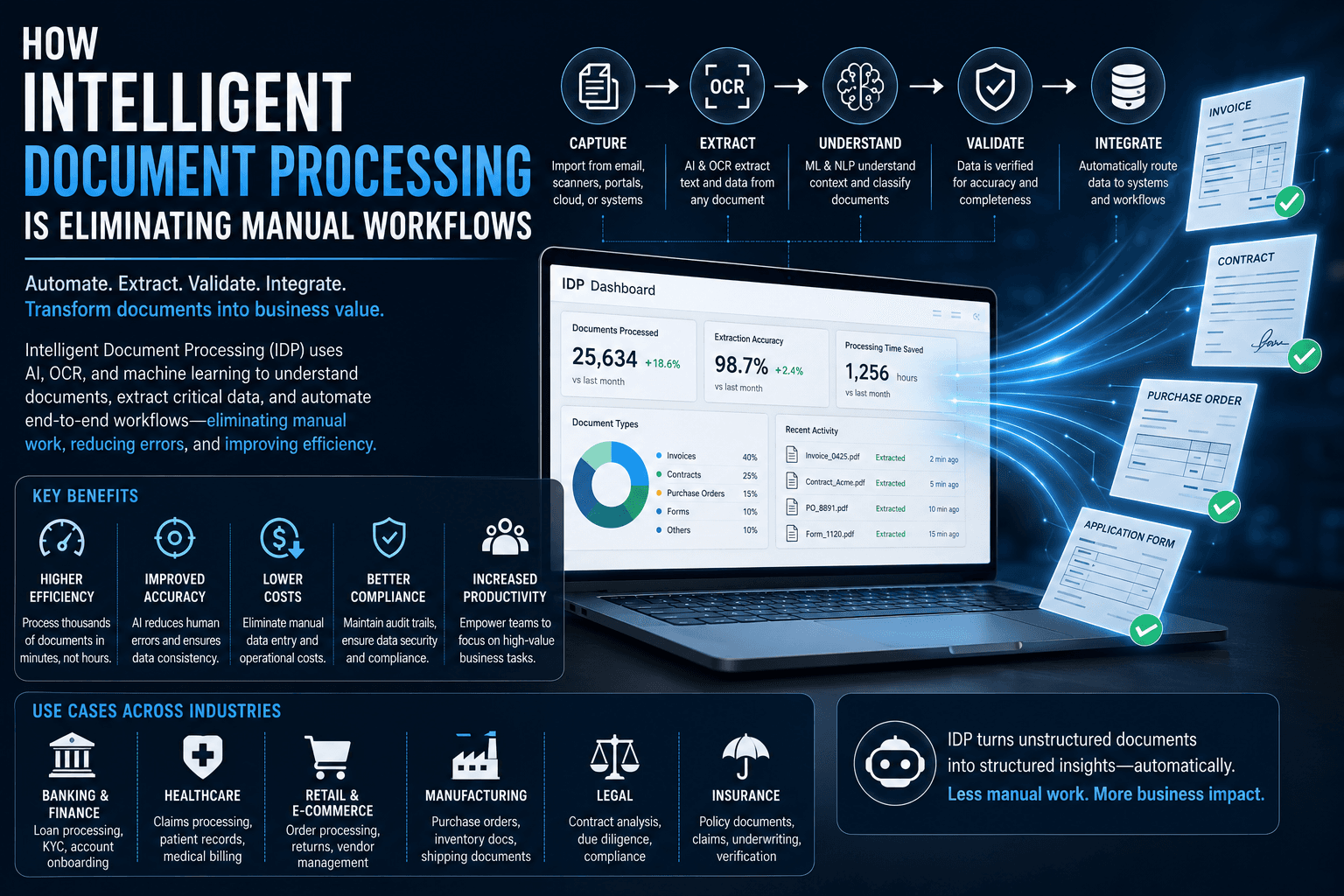

Businesses across industries still rely heavily on documents to manage everyday operations. Invoices, purchase orders, contracts, customer applications, insurance claims, receipts, forms, reports, and compliance records all contain valuable information. Yet, despite the growth of digital transformation, many organizations continue to process these documents manually.
Employees often spend hours opening files, reading information, copying data into business systems, checking for errors, and routing documents to the right departments. These repetitive workflows consume time, increase operational costs, and create opportunities for human error.
Intelligent Document Processing (IDP) is changing this model. By combining artificial intelligence, optical character recognition, machine learning, natural language processing, and automation, IDP platforms can understand and process documents with significantly less human intervention.
As organizations look for ways to improve productivity and reduce administrative workloads, intelligent document processing is becoming an important part of modern automation strategies.
What Is Intelligent Document Processing?
Intelligent Document Processing is an AI-powered technology that automatically captures, extracts, classifies, validates, and processes information from documents.
Traditional document scanning primarily converts paper documents into digital images. OCR can then recognize printed characters. IDP goes much further by attempting to understand the meaning and context of the information contained within a document.
For example, an IDP system processing an invoice can identify:
Vendor name
Invoice number
Invoice date
Purchase order number
Tax amount
Total amount
Payment terms
Line items
The extracted information can then be validated and transferred directly into accounting, enterprise resource planning, customer relationship management, or workflow systems.
This allows employees to focus on tasks that require judgment rather than spending large amounts of time entering data.
Why Manual Document Workflows Are Becoming a Problem
Manual document processing can appear manageable when organizations handle relatively small volumes. However, as companies grow, document workloads can increase dramatically.
A typical manual process may involve receiving a document by email, downloading it, opening the file, reading the information, entering data into a system, checking the information, saving the document, and forwarding it to another employee.
Every additional step introduces potential delays and errors.
Common challenges include:
1. Data Entry Errors
Employees can accidentally enter incorrect numbers, dates, names, or account information. Even small errors can create problems in financial, operational, or customer records.
2. Slow Processing Times
Manual workflows require employees to process documents individually. During periods of high demand, backlogs can quickly develop.
3. High Administrative Costs
Organizations need employees to perform repetitive tasks that could potentially be automated. As document volumes increase, labor requirements can increase as well.
4. Poor Visibility
Documents moving through email inboxes and shared folders can be difficult to track. Managers may not know where a document is in the approval process.
5. Employee Productivity Issues
Highly skilled employees may spend valuable time performing repetitive administrative work instead of focusing on analysis, customer service, innovation, and strategic activities.
How AI-Powered Document Processing Works
Intelligent document processing generally involves several stages.
Document Capture
The system first receives documents from sources such as email, scanners, cloud storage, mobile applications, enterprise systems, or digital uploads.
Document Classification
AI models determine what type of document has been received.
For example, the system may distinguish between an invoice, receipt, contract, application form, purchase order, or insurance claim.
Data Extraction
OCR and AI models identify important information within the document.
Modern systems can process both structured documents with predictable layouts and unstructured documents where information appears in different locations.
Contextual Understanding
Machine learning and natural language processing help the system understand relationships between pieces of information.
For example, it can determine which amount represents the invoice total rather than simply identifying every number on the page.
Validation
Extracted information can be checked against business rules, databases, or other documents.
If information appears inconsistent or suspicious, the system can send the document to a human employee for review.
Workflow Automation
Once information has been validated, it can automatically trigger the next step in the workflow.
An invoice, for example, could be routed to the appropriate manager for approval and then forwarded to the accounting system.
IDP and Robotic Process Automation
Intelligent document processing often works alongside Robotic Process Automation (RPA).
RPA is effective at executing repetitive, rule-based actions such as moving information between applications. However, traditional RPA can struggle when information comes in different document formats.
IDP provides the intelligence needed to understand documents, while RPA can automate what happens after the information has been extracted.
Together, these technologies can create end-to-end automated workflows.
For example:
Invoice received → IDP reads invoice → information extracted → data validated → RPA enters information into ERP → approval requested → accounting workflow completed.
This combination can dramatically reduce manual intervention.
Industries Benefiting From Intelligent Document Processing
IDP has applications across numerous industries.
Banking and Financial Services
Banks process loan applications, account documents, financial statements, identity documents, and compliance records.
IDP can help automate document-heavy processes while improving processing speed and consistency.
Healthcare
Healthcare organizations manage patient forms, insurance documents, medical records, invoices, and administrative paperwork.
Automating document workflows can reduce administrative workloads and allow staff to focus more on patient-facing activities.
Insurance
Insurance companies process claims, policy documents, photographs, forms, and supporting records.
IDP can extract information from claims documents and help route cases to the appropriate workflow.
Logistics and Supply Chain
Shipping documents, purchase orders, invoices, customs paperwork, and delivery records create significant administrative workloads.
Automated document processing can help logistics companies accelerate information flow across supply chain systems.
Legal Services
Law firms manage contracts, court documents, case files, agreements, and other large document collections.
AI-powered document processing can help organize and extract information from large volumes of legal documents.
Retail and E-Commerce
Retail businesses handle supplier invoices, purchase orders, receipts, returns, and customer documents.
Automation can improve back-office efficiency while reducing manual data entry.
Benefits of Intelligent Document Processing
The growing adoption of IDP is driven by several important benefits.
Faster Processing
AI can process large volumes of documents much faster than manual workflows.
Reduced Errors
Automated extraction and validation can reduce common data-entry mistakes.
Lower Operational Costs
Organizations can reduce the amount of employee time spent on repetitive administrative tasks.
Better Employee Productivity
Employees can spend more time on activities that require reasoning, communication, creativity, and decision-making.
Improved Customer Experiences
Faster document processing can help companies respond to customers more quickly.
Greater Scalability
Automated systems can process increasing document volumes without requiring proportional increases in administrative staff.
Improved Compliance
Automated workflows can create consistent records and audit trails, making it easier for organizations to monitor processes.
The Role of Generative AI in Document Processing
Generative AI is expanding the capabilities of intelligent document processing.
Traditional OCR and extraction systems typically focus on identifying predefined fields. Generative AI can help organizations work with more complex and unstructured documents.
For example, an AI system could summarize a lengthy contract, identify important clauses, compare documents, answer questions about their contents, or highlight potentially important information.
This creates opportunities for organizations to move from simple document extraction toward document intelligence.
Instead of simply asking, "What information is in this document?" businesses can increasingly ask, "What does this document mean, and what should happen next?"
Challenges Organizations Need to Consider
Despite its advantages, IDP is not completely automatic or error-free.
Poor-quality scans, handwritten information, unusual document formats, ambiguous language, and missing data can reduce accuracy.
Organizations also need to consider data privacy and security, especially when documents contain financial, personal, medical, or confidential business information.
Human review remains important for high-risk or ambiguous cases. The strongest implementations generally use automation for routine documents while directing exceptions to employees.
The Future of Intelligent Document Processing
The future of IDP will likely involve increasingly intelligent and autonomous workflows.
AI systems are becoming better at understanding complex documents, identifying relationships between information, and determining what actions should follow.
Organizations may increasingly move from workflows where employees manually move information between systems to workflows where AI agents interpret documents and coordinate multiple business processes.
For example, a supplier contract could be analyzed automatically, important dates could be identified, obligations could be extracted, relevant employees could be notified, and information could be synchronized with enterprise systems.
This represents a broader shift from document digitization to intelligent business automation.
Conclusion
Intelligent document processing is transforming how organizations manage information-intensive workflows. By combining OCR, artificial intelligence, machine learning, natural language processing, and automation, businesses can extract valuable information from documents and move it through digital workflows with less manual intervention.
The technology does not simply eliminate paperwork. Its larger value comes from eliminating repetitive work, improving data accuracy, accelerating processes, and allowing employees to concentrate on higher-value responsibilities.
As AI capabilities continue to improve, intelligent document processing is likely to become an increasingly important foundation for organizations seeking greater efficiency and scalable digital operations.
Frequently Asked Questions
1. What is intelligent document processing?
Intelligent Document Processing is an AI-powered technology that captures, classifies, extracts, validates, and processes information from digital and physical documents. It combines technologies such as OCR, machine learning, natural language processing, and automation to reduce manual document-related work.
2. How does intelligent document processing eliminate manual workflows?
IDP automates repetitive activities such as reading documents, extracting information, entering data, validating fields, classifying files, and routing documents. Instead of employees completing every step manually, AI systems can handle routine processes and send only exceptions to human workers.
3. What is the difference between OCR and IDP?
OCR primarily converts text from images or scanned documents into machine-readable text. IDP goes further by understanding, classifying, extracting, validating, and processing information from documents within a business workflow.
4. Can intelligent document processing handle unstructured documents?
Yes. Modern IDP platforms can process many unstructured documents, including contracts, emails, reports, letters, and other files where information does not follow a fixed layout. AI models can identify relevant information based on context rather than relying only on predefined positions.
5. Is intelligent document processing the same as RPA?
No. RPA focuses primarily on automating repetitive actions across software applications, while IDP focuses on understanding and extracting information from documents. The two technologies can work together to create automated end-to-end workflows.
6. Which industries use intelligent document processing?
IDP can be used in banking, insurance, healthcare, logistics, manufacturing, retail, legal services, government, telecommunications, and many other industries that handle large amounts of documentation.
7. Can IDP process invoices automatically?
Yes. Invoice processing is one of the most common IDP applications. Systems can extract vendor information, invoice numbers, dates, taxes, purchase order numbers, line items, and totals before sending the information into accounting or ERP workflows.
8. Can intelligent document processing reduce data-entry errors?
Yes. Automated extraction and validation can reduce many common data-entry errors associated with manually copying information from documents into business systems. Organizations can also configure validation rules to identify questionable information.
9. Does IDP completely replace human employees?
Not necessarily. The goal is usually to reduce repetitive work rather than eliminate human involvement completely. Employees can review exceptions, make complex decisions, handle unusual documents, and supervise automated workflows.
10. How does AI improve document processing?
AI allows document-processing systems to understand context, recognize different layouts, classify documents, extract relevant information, summarize content, and identify relationships between data points. This makes automation possible even when documents are not standardized.
11. Can IDP process handwritten documents?
Some IDP platforms can process handwritten information, but accuracy depends on handwriting quality, document quality, language, and the capabilities of the underlying AI models. Important information may still require human verification.
12. Is intelligent document processing secure?
IDP security depends on how the platform is designed, deployed, and managed. Organizations should evaluate encryption, access controls, data retention, compliance capabilities, audit logs, and whether sensitive information is processed by third-party AI services.
13. How much can businesses save with IDP?
Savings vary significantly depending on document volume, existing labor costs, process complexity, automation accuracy, and implementation costs. Businesses generally evaluate IDP by measuring processing time, manual effort, error rates, and cost per document before and after implementation.
14. Can IDP integrate with existing business software?
Yes. Many IDP solutions are designed to integrate with ERP, CRM, accounting, workflow, document-management, and other enterprise systems through APIs, connectors, or automation platforms.
15. What types of documents can IDP process?
IDP can process invoices, receipts, contracts, purchase orders, applications, claims, tax forms, financial statements, identity documents, shipping records, emails, reports, and many other document types.
16. How does IDP improve customer service?
By accelerating document-heavy processes, IDP can help organizations respond to customers faster. For example, loan applications, insurance claims, account-opening documents, and service requests can be processed more quickly.
17. Can small businesses use intelligent document processing?
Yes. Cloud-based IDP platforms can make document automation accessible to smaller organizations without requiring them to build large internal AI infrastructures. Businesses can begin with high-volume processes and expand automation gradually.
18. What are the biggest challenges of implementing IDP?
Common challenges include data privacy, integration with legacy systems, inconsistent document formats, poor-quality scans, AI accuracy, employee adoption, workflow redesign, and selecting the right automation use cases.
19. What is the future of intelligent document processing?
The future is moving toward more autonomous document workflows. AI systems will increasingly understand complex documents, extract business insights, make workflow recommendations, and trigger actions across multiple enterprise applications.
20. Why is intelligent document processing important for digital transformation?
IDP helps organizations turn unstructured information into usable digital data while reducing repetitive administrative work. This makes it an important component of broader digital transformation strategies focused on automation, efficiency, scalability, and AI-powered business operations.