The web browser has been one of the most important tools in modern business. For decades, browsers have primarily acted as gateways to websites and web applications. Employees search for information, open software platforms, read documents, communicate with colleagues, and complete tasks through browser tabs.
That model is beginning to change.
The emergence of AI-powered browsers is transforming the browser from a passive interface into an intelligent work assistant. Instead of simply displaying websites, AI browsers can understand user intent, summarize information, interact with web content, assist with research, and increasingly help users complete multi-step tasks.
This evolution could have significant implications for productivity, software usage, digital marketing, and the future of knowledge work.
What Are AI Browsers?
AI browsers combine traditional web browsing with artificial intelligence capabilities.
A conventional browser primarily responds to commands such as:
Open a website → Search → Click → Read → Navigate
An AI browser can add another layer:
Understand intent → Find information → Analyze context → Recommend or perform actions
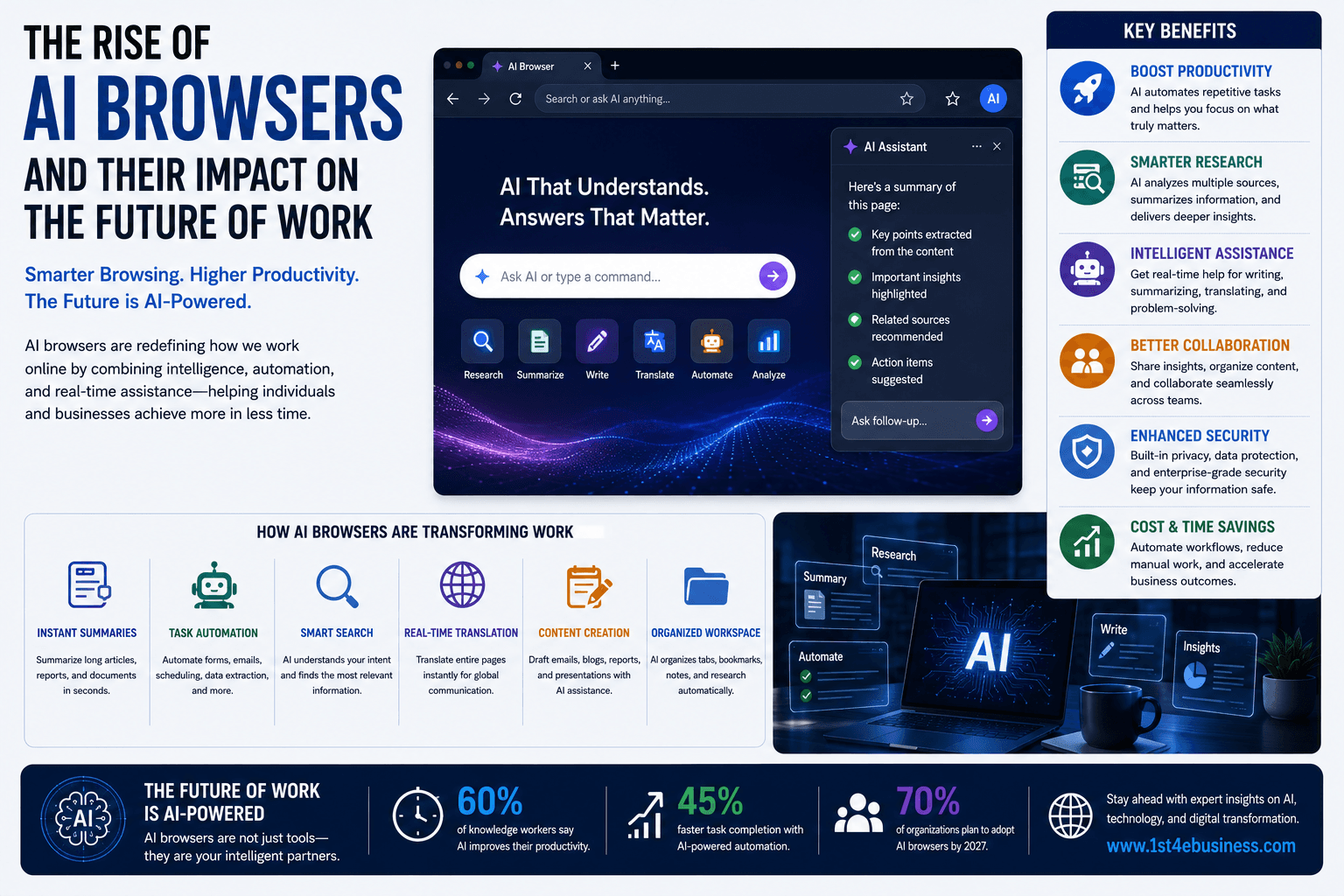
Depending on the platform, AI browser capabilities can include:
Summarizing webpages
Answering questions about open pages
Comparing information across websites
Research assistance
Writing and editing
Form filling
Task automation
Web navigation
Information extraction
Personalized recommendations
The browser increasingly becomes an intelligent layer between the user and the internet.
Why AI Browsers Matter for Businesses
Employees spend significant amounts of time working with web-based information.
They may research competitors, check customer records, compare suppliers, analyze industry news, complete online forms, and move information between applications.
Much of this work involves repetitive browsing.
AI browsers can potentially reduce the number of manual steps required.
For example, instead of opening multiple websites to research a potential supplier, an employee could ask an AI browser to compare pricing, reviews, product specifications, and business information and summarize the findings.
This could significantly reduce research time.
AI Browsers Could Change How Employees Search
Traditional search requires users to formulate queries, examine results, open pages, and determine which information is useful.
AI browsers can make the process more conversational.
An employee might ask:
"Find three enterprise software vendors that meet these requirements and summarize their pricing, security features, and customer reviews."
The AI can potentially assist with gathering and organizing the information.
This doesn't eliminate the web. Instead, it changes how people interact with it.
Users may increasingly move from searching for information to delegating research tasks.
From Browser Tabs to AI-Assisted Workflows
Modern knowledge workers often have dozens of browser tabs open.
One tab may contain a CRM system, another a document, another a research article, another an email platform, and another a spreadsheet.
AI browsers could help connect these activities.
For example, an employee could ask the browser to summarize information from several open resources and create a structured report.
This could reduce the cognitive burden associated with switching between applications.
AI Browsers and Productivity
The biggest potential benefit is productivity.
AI browsers can help employees complete routine tasks faster.
Potential applications include:
Research
AI can gather and summarize information from multiple sources.
Writing
Employees can draft emails, reports, proposals, and documents with contextual assistance.
Data Collection
AI can extract information from websites and organize it into useful formats.
Administration
AI-powered browsing may help complete repetitive forms and routine web workflows.
Customer Support
Support employees can quickly retrieve relevant information while interacting with customers.
The result could be less time spent navigating websites and more time spent making decisions.
AI Browsers Could Become Personal Work Assistants
The browser is uniquely positioned to understand what a user is doing online.
With appropriate permissions, an AI assistant can potentially understand the context of the user's current task.
For example, if an employee is reviewing a contract, the AI browser could help summarize key terms.
If a salesperson is researching a prospect, it could help organize relevant public information.
If a manager is comparing vendors, it could help create a structured comparison.
This contextual capability makes AI browsers potentially more useful than standalone chatbots.
The Rise of Browser-Based AI Agents
One of the most important developments is the integration of AI agents into browsing environments.
An AI agent can potentially perform multiple steps toward a goal.
For example:
Goal: Find the best flight for a business trip.
An agent could potentially search options, compare schedules, evaluate prices, and prepare recommendations.
For enterprise users, similar workflows could involve:
Researching vendors
Monitoring competitors
Updating online systems
Collecting market information
Preparing reports
Checking business portals
Managing routine administrative tasks
The browser becomes an environment where an AI agent can interact with the web on behalf of the user.
What This Means for the Future of Work
AI browsers could change the division of labor between humans and software.
Today, employees often act as the connection between different online systems.
They read information from one website, interpret it, and manually enter information into another.
AI agents may increasingly perform parts of this coordination.
This could shift human work toward:
Decision-making
Strategy
Creativity
Communication
Negotiation
Relationship management
Oversight
Instead of spending time moving information between systems, employees can focus on interpreting what that information means.
AI Browsers Could Reduce Digital Friction
Many business tasks are difficult not because they require advanced reasoning, but because they involve numerous small steps.
An employee may need to:
Search for information.
Open several websites.
Copy relevant details.
Compare the information.
Enter results into a document.
Send the document to a manager.
An AI browser could potentially automate parts of this process.
Reducing these small inefficiencies across thousands of employees could produce substantial productivity gains.
Implications for Software Companies
AI browsers could also change how businesses build software.
For years, companies have designed applications around users manually navigating menus, forms, buttons, and dashboards.
If AI agents can interact with software directly, the user interface may become less important for certain workflows.
Employees might increasingly tell an AI assistant what outcome they want rather than manually navigating every step.
This could encourage software companies to make their systems more accessible to AI agents through secure APIs, structured data, and agent-friendly interfaces.
The Impact on Search and Website Traffic
AI browsers could have major implications for the web itself.
If AI agents summarize information directly, users may visit fewer websites for simple informational tasks.
This could increase the importance of:
Original research
Brand authority
Product differentiation
Structured information
Trust
Unique expertise
Businesses may need to optimize not only for human visitors and traditional search engines but also for AI systems that discover and interpret web content.
AI Browsers and Cybersecurity
The increased capabilities of AI browsers also introduce security risks.
An AI agent with access to websites, accounts, documents, and business applications could potentially create significant problems if compromised or poorly controlled.
Organizations will need strong protections around:
Authentication
Permissions
Sensitive data
Browser extensions
Agent actions
Website access
Audit logs
Human approval
The principle should be simple:
An AI agent should only be able to access and act on what it is explicitly authorized to use.
Privacy Will Become More Important
AI browsers may process highly contextual information about users.
That information could include browsing activity, documents, searches, business applications, and customer interactions.
This makes privacy and data governance especially important for enterprises.
Companies should understand how AI browser systems collect, process, store, and use data before deploying them across employees.
Human Oversight Remains Essential
AI browsers can make mistakes.
An AI system might misunderstand a webpage, misinterpret information, select an inappropriate option, or make an incorrect assumption.
For low-risk tasks, automated execution may be acceptable.
For high-impact activities involving finance, legal agreements, sensitive customer information, or major business decisions, human review should remain part of the process.
The most effective model may be:
AI assists → Human reviews → AI executes approved actions
How Businesses Should Prepare
Organizations can begin preparing for AI browsers by identifying browser-heavy workflows.
Look for tasks where employees frequently:
Search across multiple websites
Copy and paste information
Complete repetitive online forms
Research competitors
Gather market information
Switch between multiple web applications
These workflows may provide strong opportunities for AI-assisted automation.
Companies should also establish clear policies covering AI permissions, security, privacy, and employee usage.
The Future of Work May Be More Agentic
The broader trend behind AI browsers is the transition from software that responds to commands toward software that can help accomplish goals.
Traditional software waits for users to click.
AI-powered software can increasingly understand intent and help determine the steps required to reach an outcome.
This is part of a larger movement toward agentic work, where employees delegate certain tasks to intelligent digital systems.
The employee remains responsible for the objective, while AI increasingly assists with execution.
Conclusion
AI browsers are transforming the traditional web browser into a more intelligent productivity platform.
By combining browsing, AI assistants, contextual understanding, and agentic capabilities, these systems can help employees research information, automate repetitive tasks, and navigate complex online workflows.
The impact could extend far beyond browsers. It may influence software design, search behavior, digital marketing, cybersecurity, and the way organizations structure knowledge work.
The future of work is unlikely to be about humans spending more time navigating software.
Instead, it may increasingly involve humans directing intelligent systems that navigate software and the web for them.
Businesses that prepare for this shift—with strong security, governance, employee training, and carefully selected use cases—will be better positioned to capture the productivity opportunities created by AI-powered browsing.